Return to the API Viewer page
Default Location: \Nanex\NxCoreAPIViewer\
NxCore Option Montage provides a concise view of a particular option chain.
The following should serve as a guide to the display fields of the Option Montage tool.
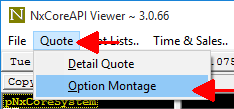
To access the Option Montage window, from API Viewer click Quote, followed by Option Montage, as seen here:
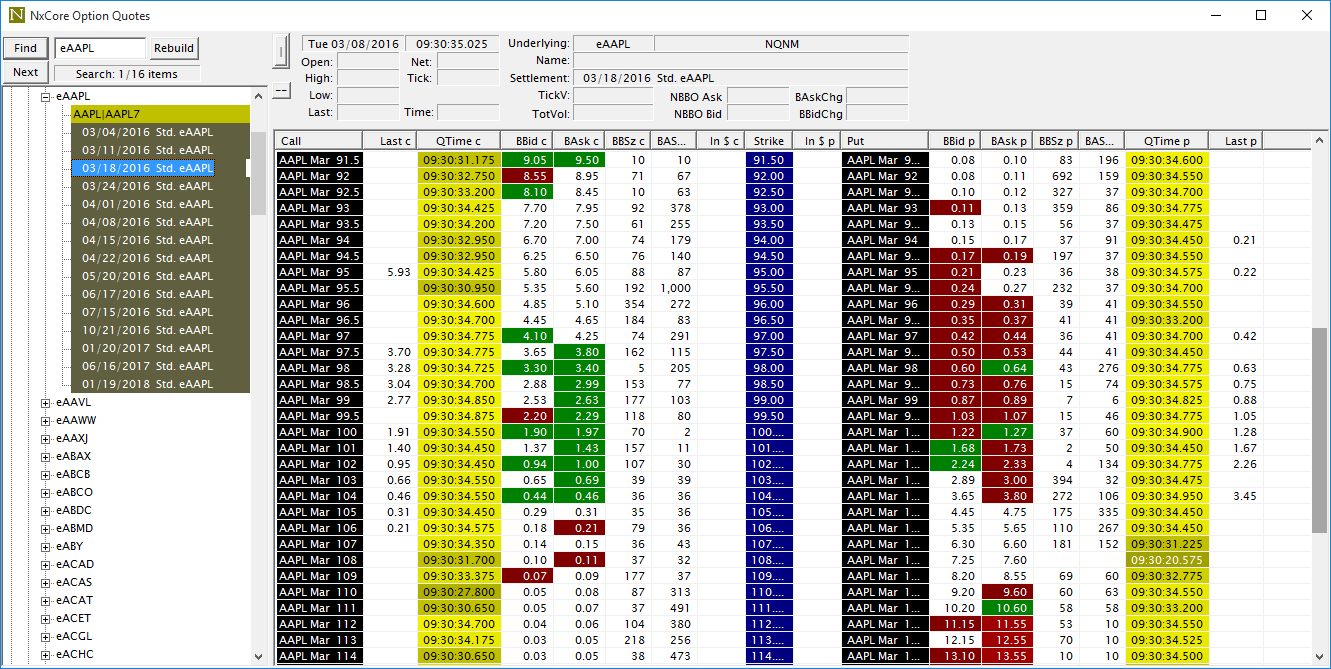
The Option Montage Window
|
The Option Montage Window provides detailed information about an option chain. Input an underlying symbol, e.g. eAAPL, click "Find",and then select an option expiration you wish to explore more deeply, in this case "03/18/2016 Std. eAAPL". Now on the right-hand side you will see each contract broken out with call information to the left of Strike, and put information to the right. Fields are color coded in one of two ways: 1) Time fields are various shades of yellow. The brighter/lighter the shade, the more recent the quote is. 2) Other numeric fields are shaded green for an increase and red for a decrease. The brighter the red/green, the larger the difference. |
Copyright Nanex, LLC and Eric Scott Hunsader, 2003-
©. All rights reserved.