NxCore tape files are broken down into an easy to use data structure.
The images below and on the following page graphically depict all the data
fields available in NxCore's tape files.
Nanex offers several packages that demonstrate coding with the NxCore API, from
the most basic examples to the most advanced. For information on all the sample
code packages we offer please visit our page "Coding in NxCore, A Developers Guide to the NxCore
Sample Applications and Source Code Libraries".
The tape files are sequential, and this means all the data is in the exact same
order as it came from the exchanges. The data comes in the exact same way as it
would in real time. The tapes are also compressed over 90%, allowing for more
data to be packed into smaller files. This makes getting real time data for
more exchanges possible. It also allows historical tapes to be downloaded
quicker.
Depending on the type of data you are interested in, NxCore has the
following symbol types: equities, options, futures, future options, indexes,
currencies, mutual funds, and bonds. A detailed list of all the exchanges and
what is avalaible on each exchange can be found here.
This overview is a general explanation of how the data is represented in NxCore
tape files. It begins with an explanation of the fields in NxCore System. More
specific information regarding the API can be found
here. NxCore
System contains the following fields:
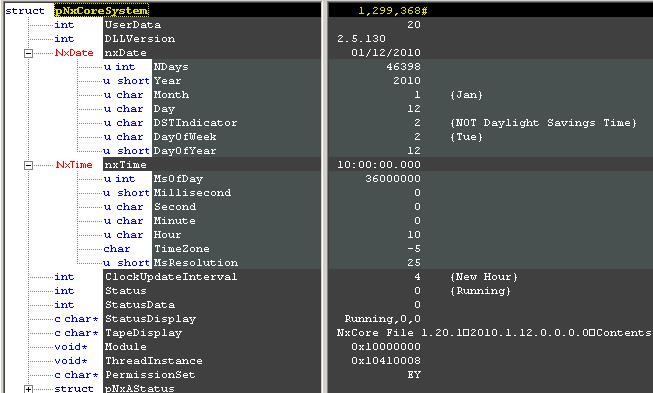
NxCore System contains all the information regarding time and status of the
tape. nxDate holds the value for the tape's date.
nxTime contains data regarding the time. While processing tape
files this is the field that will allow the user to know what time of the day
the tape is processing. While processing the tape the user can trigger events
using the time.
Status, StatusData, and
StatusDisplay are all related and tell you information about
the status of the system. Any error messages or message regarding the status of
the tape are stored in these fields. A detailed explanation of the status
messages can be
found here
NxCore Messages contain three main fields: coreHeader, coreData, and
MessageType.
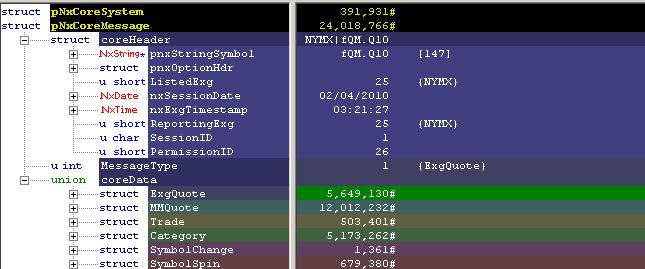
coreHeader contains the common fields required for all
trading data. As you can see from the picture it includes the symbol, option
data (if necessary) , listed and reporting exchange, and the date and time.
These are fields that are required for all message types. The overview will go
into further detail for each field.
coreData holds all the different message types and their
data. There are seven message types: Status (from pNxCoreSystem), Exchange
Quotes, Trades, Market Maker Quotes, Categories, Symbol Change, and Symbol
Spin. MessageType is a numerical representation of the size
message types. It instructs the user to what type of message is being played at
that moment in time.
The next page will detail the NxCore messages and the data they contains.
|

